

Last updated: October 2026
There is no single best time to post on YouTube. There is a best time for your channel, and YouTube already keeps the data that points to it. This guide shows you how to read the Audience heatmap in YouTube Studio, how to publish ahead of your viewers’ peak hours, how geography and format change the answer, and how to run a simple 4 to 6 week test that settles the question with your own numbers instead of a generic chart.
The short version
- No universal slot exists. The large published studies disagree with each other, because each one averages millions of unlike channels.
- Your heatmap beats every chart. In Studio, open Analytics, then Audience, then When your viewers are on YouTube.
- Publish ahead of the peak. Many creators publish 2 to 3 hours before their audience peak so the video is processed and ready as viewers arrive.
- Geography sets the clock. Schedule in the time zone where most of your watch time lives, not the time zone at your desk.
- Consistency is the stronger lever. A repeatable upload schedule you can hold beats a perfect hour you keep missing.
On this page
- Why the big timing charts disagree with each other
- What publish time can and cannot do for a video
- Where to find When your viewers are on YouTube
- How to read the purple blocks without fooling yourself
- Publish ahead of the peak, not on top of it
- Geography decides the clock before the hour does
- Scheduled upload or Premiere: picking the right release
- Shorts run on a different clock from long videos
- A schedule you repeat beats a perfect slot you miss
- The 4 to 6 week test that settles it for your channel
- No Audience data yet: sensible starting points
- Posting time questions, answered
- Keep exploring
Why the big timing charts disagree with each other
The large studies do not agree, and that disagreement is the honest starting point. Each study averages a different set of channels, formats and countries, so each one lands on a different peak window. Treat every chart as a population average, never as an instruction for your channel.
Two examples show the split clearly. Buffer analysed 1.8 million videos and reported Sunday at 10 a.m. as the strongest single slot for long form videos, with mornings ahead overall. SocialPilot analysed 301,000 videos from about 27,000 channels and pointed to weekday afternoons instead, with long form uploads at 2 p.m. to 4 p.m. local time on Wednesday, Thursday and Friday. One study crowns Sunday morning. The other crowns weekday afternoon. Both cannot be the right answer for the same channel.
Metricool adds a third shape. Its 2026 study, covering 799,718 videos from 71,177 channels, reported the highest activity for long form videos in a wide 10 a.m. to 4 p.m. band, and a later band for Shorts. RecurPost, working from more than 2 million videos, put its weekday window at 12 p.m. to 3 p.m. Four large datasets, four different answers, and none of them is lying. They are measuring different audiences.
That is the flaw in every generic chart. A gaming channel watched after school, a tutorial channel watched on lunch breaks and a travel vlog channel watched on Sunday mornings do not share a peak. Averaging them produces a time that suits the average of the group and may suit no single channel in it. Use a study window only as a first slot to test, then let your own data replace it.
What publish time can and cannot do for a video
Publish time affects the first hours of a video most: how many of your regular viewers are online to give it an early start. It does not rescue a weak title, a dull opening or a video viewers leave early, and it does not decide the long life of a video that keeps earning views from search and suggested traffic.
Think of timing as a head start, not an engine. A video published into an active audience can collect its first impressions, clicks and watch time while those viewers are already on YouTube. A video published while that same audience is asleep or at work waits hours for the same start. The gap is real, and it is also limited. Title, thumbnail and the first minute still decide whether viewers click and stay.
Where to find When your viewers are on YouTube
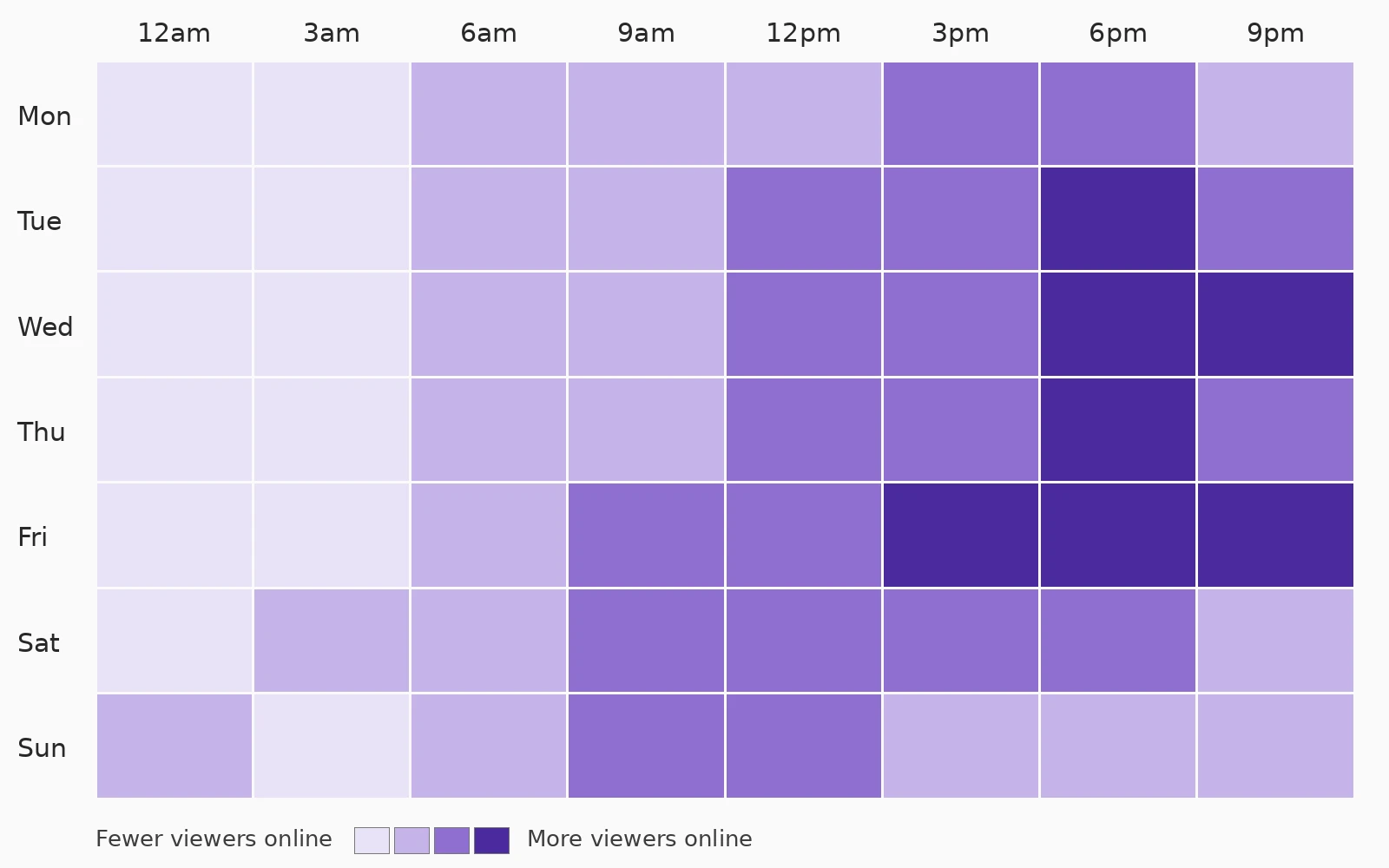
Open YouTube Studio, select Analytics in the left menu, then select Audience from the top menu. The report called When your viewers are on YouTube shows when your viewers were online across YouTube in the last 28 days, per YouTube Help.
YouTube Help describes this report in plain terms: it shows when your viewers are online across YouTube, not only when they watch your channel. Help also gives its intended uses: to help build your community, to understand when to schedule a Premiere, or to plan your next live stream. For a vlogger choosing an upload slot, that same chart is the starting point, because it is built from your viewers and nobody else.
One condition catches new channels out. The report needs enough viewer activity behind it. If your channel is small or very new, the chart may not appear yet, or YouTube may say there is not enough viewer data yet. That is a data limit, not a settings mistake. You have not switched anything off. The report fills in as your audience and its viewing history grow, so check again after a run of regular uploads.
While you are in the Audience tab, note one neighbour of the heatmap. Top geographies shows which countries give your channel the most watch time, and that report decides the time zone question in a later section. The wider tour of reports, and what each one is for, sits in our YouTube analytics for vloggers guide. This article stays on the one report that answers the timing question.
How to read the purple blocks without fooling yourself
The heatmap lays days against hours, and darker purple means more of your viewers were online in that block. Read the broad, repeated dark bands, not the single darkest square, and remember the times are shown in your own time zone, so a distant audience’s peak will appear at an unfamiliar hour in your zone.
Start with the shape, not a single cell. Look for the hours that stay dark across several days, and the days that run darker than the rest of the week. A band that repeats on Tuesday, Wednesday and Thursday evenings is a pattern. One very dark square on a single Saturday may be a holiday, a major event, or a shared link that brought many people online that day. Build your slot on the pattern.
Publish ahead of the peak, not on top of it
A common creator practice is to publish 2 to 3 hours before the audience peak, so the video has finished processing and begun gathering its first data by the time the largest group of viewers arrives. YouTube Help does not set this as a rule; it is a working habit many creators use, and your test results should confirm or replace it.
The logic is simple. An upload needs time to process, to become searchable and to collect its first impressions. If the video goes public at the exact start of the peak, part of that peak is spent on a video that has barely surfaced. If it goes public a few hours earlier, it is fully ready when the peak begins, and the smaller early audience has already given it a first read.
Scheduled publishing is what makes this repeatable. Per YouTube Help, you set a video as scheduled or private on the upload page, open the Schedule card, and set the date, time and time zone for publication. The video then goes public on its own at that time. You do not need to be at your desk, awake or in the right country when your audience peak arrives.
Geography decides the clock before the hour does
Your viewers’ location decides which clock your peak hours belong to. Check Top geographies in the Audience tab, schedule in the time zone that holds most of your watch time, and if your audience splits across regions, pick the region that matters most rather than a compromise hour that fits nobody. If no region leads clearly, pick the one with the most watch time and let the other region find the video through its first day, rather than choosing a middle hour that suits neither.
A publish time has no meaning without a place attached to it. Six in the evening for a viewer in London is early afternoon, 1 p.m., for a viewer in New York and the middle of the night for a viewer in Sydney. When a study or a fellow creator names a best hour, the first question is always: in whose time zone, for which audience? If their audience lives on another continent, their best hour may be your worst.
Work from your own split. If most of your watch time comes from one country or one region, that region owns your schedule, even if you live elsewhere. Convert your chosen slot into that region time, then set the schedule in Studio with the time zone picked deliberately, not left on your local default. A creator filming in Australia for a mostly United States audience, or in Europe for a mostly Indian audience, lives this conversion every week.

Scheduled upload or Premiere: picking the right release
A scheduled upload is the quiet, default release: the video goes public at the set time as a normal video. A Premiere turns the same moment into a shared event with a public watch page, reminders and live chat. Use a Premiere when watching together adds something, and a plain schedule when it does not.
YouTube Help sets out how each one works. For a scheduled upload, you choose Schedule on the upload page and set the date, time and time zone. For a Premiere, you schedule in the same way and also check Set as Premiere, or choose Set as instant Premiere to start once processing finishes. Before a Premiere starts, its watch page is public: viewers can set a reminder, leave a comment and chat, and you can share that page link ahead of time. During the Premiere, viewers watch together in real time, and afterwards the video stays on your channel as a regular upload. Shorts are not supported for Premieres, so this choice applies to long videos.
Shorts run on a different clock from long videos
Studies that split the formats out consistently find Shorts peaking at different hours from long form videos, often later in the day. Give Shorts their own slot rather than stacking them on your long video slot, and hold timing looser for Shorts, since a Short can keep resurfacing after its first day. Treat the Shorts slot as a window, not an exact hour.
Buffer, in its 1.8 million video analysis, found the split in its own data: long form peaked on Sunday morning while its top Shorts slots were all on Friday, at 4 p.m., 6 p.m. and 7 p.m. SocialPilot likewise reported separate Shorts windows, around midday and again in the early evening. Metricool placed its Shorts band at 2 p.m. to 6 p.m., later than the start of its long form band. The exact hours differ by study, as always. The shared observation is the split itself: the two formats do not peak together.
The viewing habit explains it. A long video is a sitting down choice, often planned around a meal, an evening or a weekend morning. A Short is a scrolling choice, fitted into short gaps across the day on a phone. Those two habits peak at different times, so one shared publish hour will usually be early for one format and late for the other.
Keep the response practical. If you publish both formats, set a long video slot from your heatmap and a separate Shorts slot, and do not release both in the same hour to compete for the same opening attention. For the wider craft of making vertical videos that hold viewers, see our vertical video guide for Shorts, Reels and TikTok. That guide covers cadence; this article only decides when each finished piece goes out.
A schedule you repeat beats a perfect slot you miss
A steady upload schedule is the stronger lever over time. Regular viewers learn when to expect you, each upload gets a comparable start, and your timing test only works if the slot is held steady long enough to read. Pick a cadence you can sustain, then defend it.
Consistency does three jobs at once. It trains a habit in your audience, so regulars check in around your usual day and hour. It gives YouTube a repeatable pattern of early viewing on your channel. And it cleans up your own data: when every video in a series goes out in the same slot, differences in performance point at the video, not at a random publish hour.
Keeping the slot is a production problem as much as a publishing one. Filming several videos in one session and scheduling the finished uploads is what lets a weekly slot survive travel, illness and busy work weeks. That production side has its own full routine in our guide to how to batch film videos. This article only needs the outcome: a finished video ready early enough to schedule, every time.

The 4 to 6 week test that settles it for your channel
Hold your content type, cadence and video length steady, rotate two or three candidate slots across 4 to 6 weeks, and judge each slot on first day impressions and click through rate, with watch time as support. One video proves nothing; a run of similar videos in each slot gives you a slot you can trust.
Set the test up like this:
- Pick candidates from your heatmap. Choose your current slot plus one or two slots placed a few hours ahead of your darkest bands. Three slots at most.
- Freeze everything else. Same kind of video, similar length, same day pattern where you can, and your usual care with titles and thumbnails. If the videos differ wildly, the test reads the videos, not the clock.
- Rotate, do not drift. Give each slot at least two uploads, spread across the test weeks, so one slot does not collect all the strong topics or all the weak ones.
- Record the first 24 hours. For each video, note impressions and click through rate at the one day mark, plus views and watch time for context. The Reach and Audience reports hold these numbers.
- Judge the pattern, then commit. The winning slot should win across its videos, not on one outlier. Adopt it as your default, and retest only when your audience geography or format mix changes a lot.
Two traps ruin most home tests. The first is judging on views alone after a week, when search and suggested traffic have buried the first day signal you were trying to isolate. The second is changing the slot and the content at the same time, then crediting the clock for a better topic. If a result surprises you, extend the test by two weeks rather than rewriting your schedule on one video. For the broader habit of reading results without fooling yourself, our guide to how to get more views on YouTube covers the surrounding growth checks.
No Audience data yet: sensible starting points
With no heatmap yet, start from your intended audience, not from a global chart: pick the evening or weekend slot that fits their daily life in their main time zone, hold it steady, and check when similar channels publish, on their channel pages. These are starting points to test, and you replace them with your own heatmap as soon as it appears.
Reason it out from the viewer day. Working adults watch long videos mostly outside work hours, so a late afternoon publish ahead of an evening peak is a sensible first slot for a general vlog audience. Students skew later still. Weekend mornings suit planning, learning and longer weekend viewing. None of these is a rule. Each is a reasoned first guess for a stated audience, which is exactly how a starting point should work.
Then do the only thing that turns a guess into knowledge: publish on that schedule without chopping and changing it. Every upload adds the viewing history your Audience tab needs. Once the When your viewers are on YouTube report appears, run the test from the previous section and let your own viewers overrule both the studies and the borrowed pattern. A new channel does not have a timing problem yet. It has a data problem, and regular publishing is the fix.
Posting time questions, answered
Quick answers on publish time, scheduling and the Audience heatmap.
Is there a single best time to post on YouTube?
No. The large studies disagree with each other: Buffer reports Sunday at 10 a.m. as its top long form slot, while SocialPilot points to weekday afternoons at 2 p.m. to 4 p.m. Each average covers different channels and audiences. Your own Audience heatmap is the answer for your channel.
Where do I find when my viewers are online?
In YouTube Studio, select Analytics, then Audience. The report called When your viewers are on YouTube shows when your viewers were online across YouTube in the last 28 days, per YouTube Help.
Why does the When your viewers are on YouTube report not show on my channel?
The report needs enough viewer activity behind it. Very new or very small channels may not have sufficient data yet, so the chart does not appear. Keep publishing on a steady schedule and check again as your audience grows.
How far ahead of the peak should I publish?
Many creators publish 2 to 3 hours before their audience peak, so the video is processed and gathering first data as viewers arrive. That is creator practice, not a YouTube rule. Test a shorter and a longer gap on your own channel and keep the one your first day numbers support.
Which time zone should I schedule in?
The time zone where most of your watch time lives. Check Top geographies in the Audience tab, convert your slot into that region time, and set the time zone deliberately in the Schedule card instead of leaving your local default.
Do Shorts need a different posting time from long videos?
Studies that split the formats out find different peaks. Buffer reports Friday late afternoon and evening slots on top for Shorts, against a Sunday morning peak for long form. Give each format its own slot and do not release both in the same hour.
How do I schedule a video to publish later?
Per YouTube Help, set the video as scheduled or private on the upload page, open the Schedule card, set the date, time and time zone, then select Schedule. The video goes public at that time on its own, and you can change the time later from Content while it is still scheduled.
Should I use a Premiere instead of a normal scheduled upload?
Use a Premiere when watching together adds value: a launch, a milestone or a video where live chat matters. Its watch page is public before it starts, so viewers can set reminders. For a routine video, a plain scheduled upload at the same hour does the same timing job with less fuss. Shorts are not supported for Premieres.
How long should I test a posting time before judging it?
Run each candidate slot for at least two similar uploads across a 4 to 6 week test. Judge on first day impressions and click through rate, not on one video and not on views after a week, when later traffic hides the launch signal.
What should a brand new channel do about posting time?
Pick a reasoned starting slot for your intended audience in their main time zone, such as late afternoon ahead of evening viewing, or a weekend morning for longer videos. Hold it steady, note when similar channels publish, and switch to your own heatmap as soon as the Audience report has enough data to show.
Keep exploring
Timing is one lever. These guides cover the data and systems around it.