Last updated: October 2026
The best teleprompter for YouTube is the Elgato Prompter for most creators: its built in display puts your script exactly where the lens is, with no second screen to charge, mount or mirror. Creators who record standing up or further back should look at the Prompter XL instead, tablet owners are well served by two classic rigs, and phone first channels get honest options that cost far less. Below are the six worth buying in 2026, with the tradeoffs the spec sheets leave out.
A teleprompter does one job: it keeps your eyes on the lens while you read, so a scripted video still feels like a conversation. Get the size or the glass wrong and you trade that for dimmer footage and visible eye movement. This guide matches each pick to a real setup, desk or studio, phone or mirrorless, and to the camera you already own. If the camera itself is the weak link, start with our best vlogging cameras guide instead and come back here second.
In this guide
- Quick Picks: The Short Version
- The 6 Best Teleprompters for YouTube, Pick by Pick
- Side by Side: All Six Teleprompters Compared
- App Only, Phone Rig or Built In Display: Which Path Fits You?
- How Far Will You Sit? Match Size to Reading Distance
- Beamsplitter Glass: What the Split Does to Your Picture
- Before You Buy: The Compatibility Checklist
- Teleprompter FAQs
As an Amazon Associate I earn from qualifying purchases.
Quick Picks: The Short Version
Short on time? These are the six picks and the one job each does best.
Our 6 Picks at a Glance
- Elgato Prompter: best overall. A built in display and a single cable make it the easiest prompter to live with.
- Elgato Prompter XL: best for larger setups. A 15.6 inch screen you can read from 10 to 15 feet away.
- Glide Gear TMP 100: best classic tablet rig. The proven beam splitter design for mirrorless and DSLR shooters.
- NEEWER Basics X12B: best for tablet users. A 12 inch glass, a remote in the box and no assembly.
- Padcaster Parrot Pro: best for phone shooters. It screws straight onto the lens and travels in its own case.
- FEELWORLD TP10: best budget folding pick. It folds to 27 mm thin and weighs just 315 g.
The 6 Best Teleprompters for YouTube, Pick by Pick
1. Elgato Prompter: Best Overall Teleprompter for YouTube
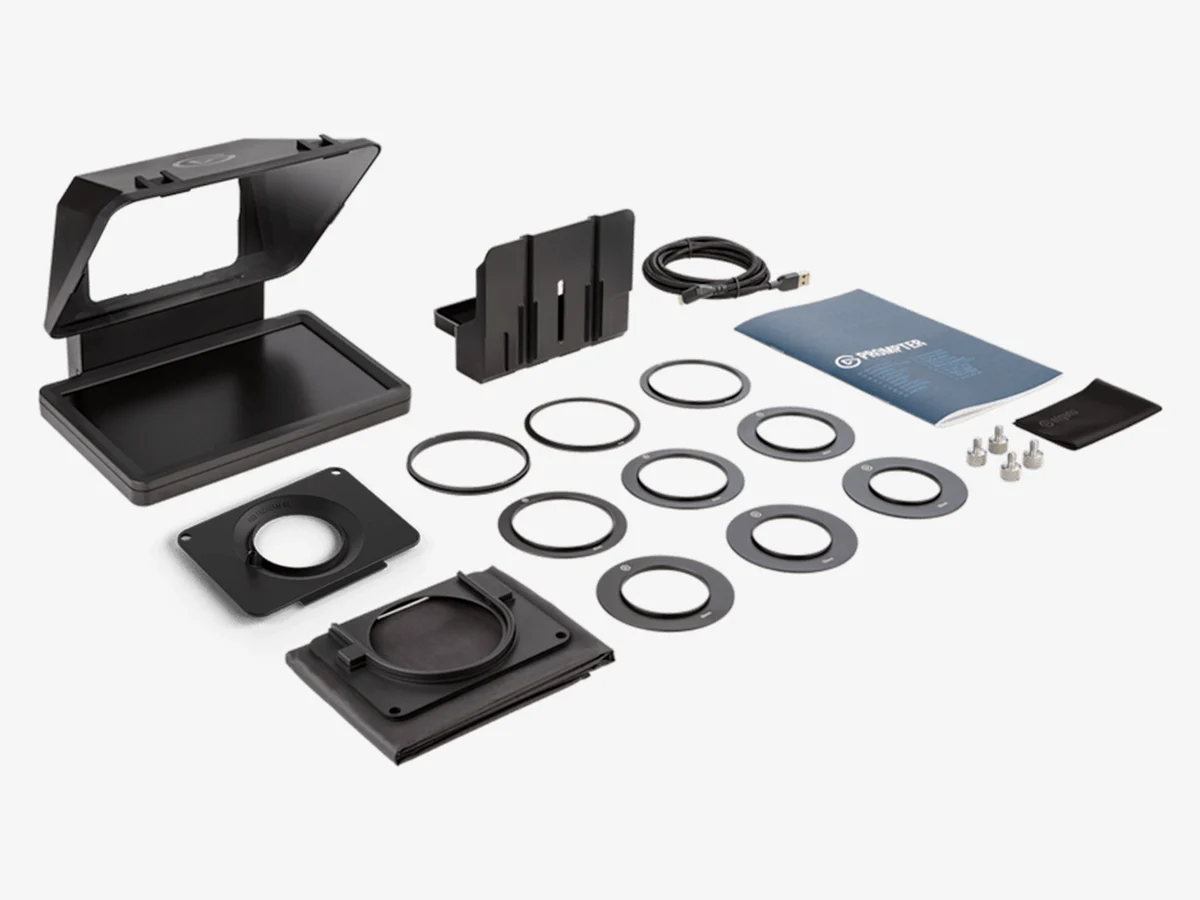
The Elgato Prompter removes the part of prompting everyone hates: the second screen. Its 9 inch display is built into the unit and runs over one USB-C cable, so your script lives inside Elgato’s Camera Hub software on the computer already on your desk. For a talking head channel recording at arm’s length, nothing else here is as simple to set up or as easy to forget is there.
The tradeoff is range. Elgato rates the display as readable up to about 6 feet away, which suits desk setups and close standing shots, not the far side of a room. Check the full details below.
Technical features
- Built in 9 inch display at 1024 x 600, powered and driven over a single USB-C cable
- Real 70/30 beamsplitter glass, so the camera keeps most of the light
- Nine step up rings in the box: 49, 52, 55, 58, 62, 67, 72, 77 and 82 mm
- Universal backplate fits most mirrorless and DSLR lenses, with an L-bracket for shorter lenses up to 11 cm
- Camera Hub software (free, PC and Mac) shows your script or any window you choose
- Voice Sync scrolls the text with your voice; it needs an NVIDIA RTX 2060 or newer, or Apple M1 or newer
- Also works with webcams, smartphones and action cameras; a phone used as the camera needs a 1/4 inch phone mount, not included
- Two 1/4 inch threads and cold shoe mounts on top for a microphone or light
- 690 g without accessories
Pros
- No second screen to charge, mount or mirror: the display is built in
- One cable to the computer and nothing else to power
- Voice Sync follows your voice, so your hands stay free
- The nine ring set covers almost any vlogging lens
Cons
- Reading distance tops out around 6 ft, so it suits close setups only
- Voice Sync needs a fairly recent GPU or Apple silicon
- No physical remote in the box: control runs through the software
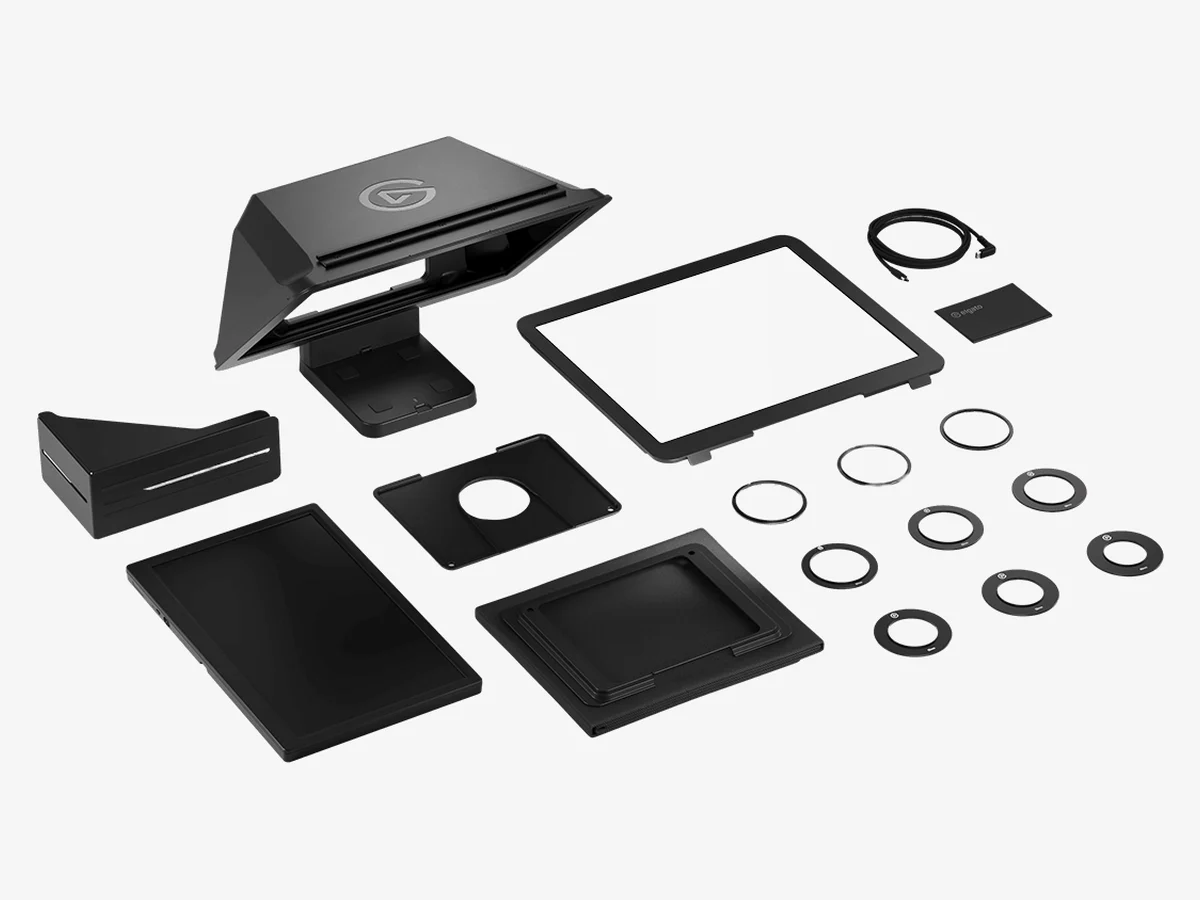
2. Elgato Prompter XL: Best for Bigger Rooms and Standing Setups
The Elgato Prompter XL is the same idea scaled up for creators who do not sit at a desk: fitness instructors, teachers, presenters and anyone who records standing across the room. Its detachable 15.6 inch display stays readable at 10 to 15 feet, and it doubles as a second monitor when the prompter glass comes off.
It is a commitment, though. The XL cannot hang from your lens like its smaller sibling: it needs a tripod or C-stand, a USB-C port that can deliver 15 W, and a permanent corner of your room. Check the full details below.
Technical features
- Detachable 15.6 inch display at 1920 x 1080 and 600 nits, bright enough for lit rooms
- 70/30 beamsplitter glass, detachable for cleaning and transport
- Elgato rates comfortable reading at 10 to 15 ft, the longest range in this guide
- Reinforced aluminium bracket with an accessory rail on top for lights and microphones
- Mounts on a tripod or C-stand (2 x 1/4 inch and 1 x 3/8 inch threads); it cannot mount on the lens
- Needs a USB-C 3.2 port delivering 15 W; a powered hub or Thunderbolt dock works
- Nine step up rings from 49 to 82 mm plus a universal backplate; takes lenses up to 22 cm long
- Camera Hub with Voice Sync, needing an NVIDIA RTX 2060 or newer, or Apple M1 or newer
- Display works on its own as a regular computer monitor
- 3.37 kg with the camera bracket
Pros
- Big, bright text you can read from across the room
- Display detaches and doubles as a second monitor
- Built for full size camera rigs and longer lenses
Cons
- A sturdy tripod or C-stand is mandatory, not optional
- The 15 W USB-C requirement rules out weak ports and cheap hubs
- The heaviest and most demanding setup in this guide
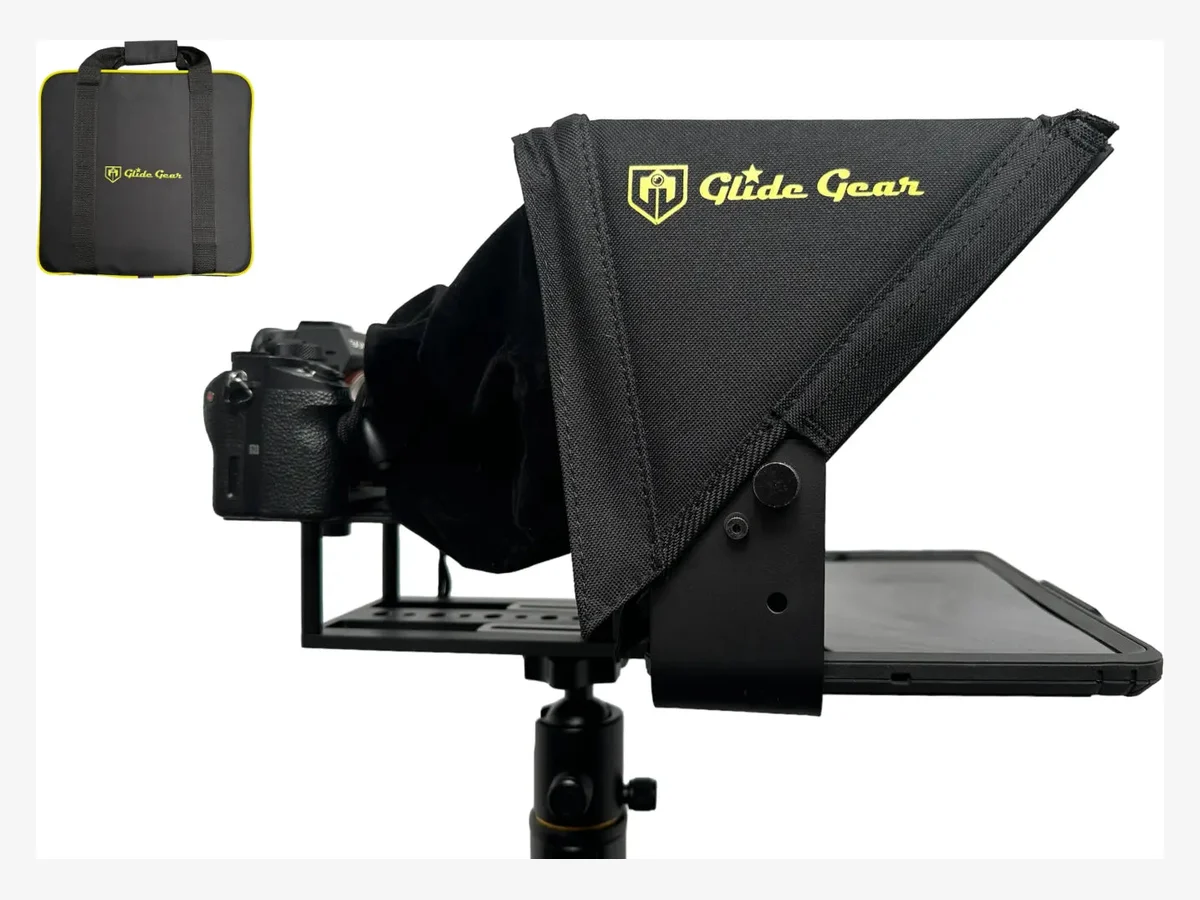
3. Glide Gear TMP 100: Best Classic Beam Splitter Rig
The Glide Gear TMP 100 is the traditional design most established YouTube studios started with: a hooded beam splitter on a frame, your tablet in the tray, your camera behind the glass. It asks more of you than the Elgato pair, no screen, no app, no remote, and in return it works with almost any camera and any prompting app you already like.
One warning before anything else: Glide Gear states the TMP 100 does not fit the iPad Pro. Standard iPads, the Air and the Mini are exactly what it was built around. Check the full details below.
Technical features
- Bring your own screen: any phone or tablet up to 10.5 x 8 inches, with the iPad, iPad Air and iPad Mini named by Glide Gear
- iPad Pro does not fit, per Glide Gear’s own product page
- Maker stated reading range of up to 10 ft
- Aluminium construction with a protective hood that blocks stray light from the glass
- Collapses down and packs into the included carry bag for storage and travel
- Offset adapter included to center a phone’s lens when you shoot with a phone
- Works in front of DSLRs and mirrorless cameras, or directly with a phone
- Camera mounts on a 1/4-20 screw on the back plate, per the maker’s manual
- Fits camera and lens combinations up to 7.9 inches (20 cm) from the mounting hole to the front of the lens, per the manual
- Works with any mirror text teleprompter app; no app and no remote are included
Pros
- One prompter covers camera shooting and phone shooting alike
- Generous tablet sized glass with a proper light blocking hood
- Folds down and travels in its own carry bag
Cons
- iPad Pro owners cannot use it at all
- You supply the screen, the app and any remote yourself
- Assembly takes longer than the fold open designs
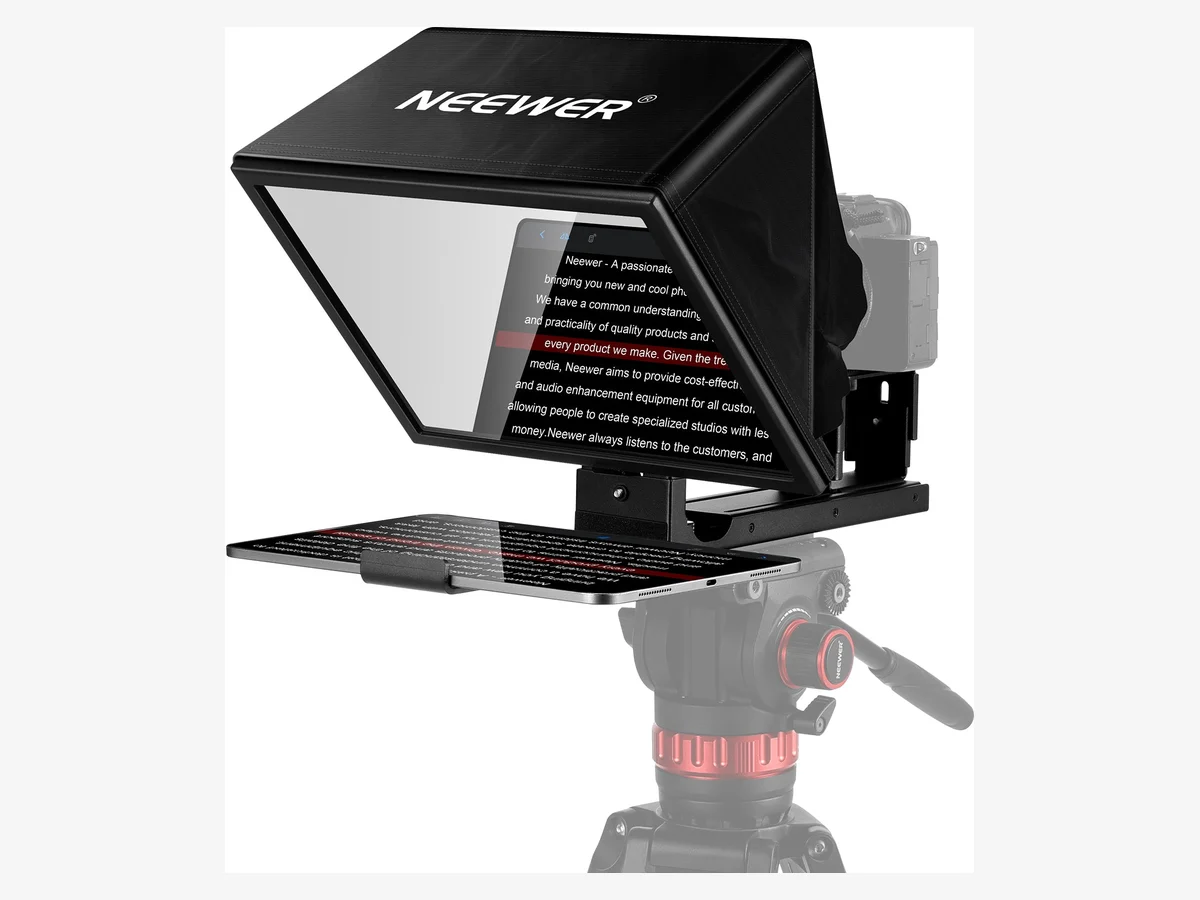
4. NEEWER Basics X12B: Best Teleprompter for Tablet Users
The NEEWER Basics X12B is the tablet rig with the fewest asterisks: a 12 inch glass, a proper remote in the box, NEEWER’s own app, and a frame that folds open with no assembly at all. If your setup is an iPad in front of a mirrorless camera at a desk, this is the straightforward buy.
The one limit is printed by NEEWER itself and worth taking seriously: this prompter is not for phone shooting. A phone can sit in it as the prompt screen, but the recording device has to be a real camera. Check the full details below.
Technical features
- 12 inch beam splitter glass with 75% light transmittance, the highest figure in this guide
- Reflected text readable up to 10 ft (3 m) away, per NEEWER
- RT113 remote included: play and pause, scroll speed, page turns and font size
- NEEWER Teleprompter app for script control, on iOS 11 and Android 6 and later
- No assembly design: it folds open, and the liftable platform keeps the lens centered
- Prompt screen fit: phones and tablets up to 9.84 x 8.68 inches, including the iPad Pro 11 inch
- Not compatible with the iPad Pro 12.9 inch; the camera lens must be longer than 28 mm, with no wide angle lenses
- NEEWER states it is not for phone shooting: a phone can display the script, but cannot be the camera
- Aluminium alloy body at 1,664 g, with 1/4 inch and 3/8 inch mounting threads
- Storage hand bag and cleaning cloth included; the remote’s AAA battery is not
Pros
- A real remote is in the box, where rivals charge extra or skip it
- Folds open ready to use, with nothing to assemble
- 75% light transmission keeps the camera image bright
Cons
- No phone shooting, full stop: the camera must be a camera
- The iPad Pro 12.9 inch and wide angle lenses are excluded
- You will need to buy the remote’s AAA battery separately
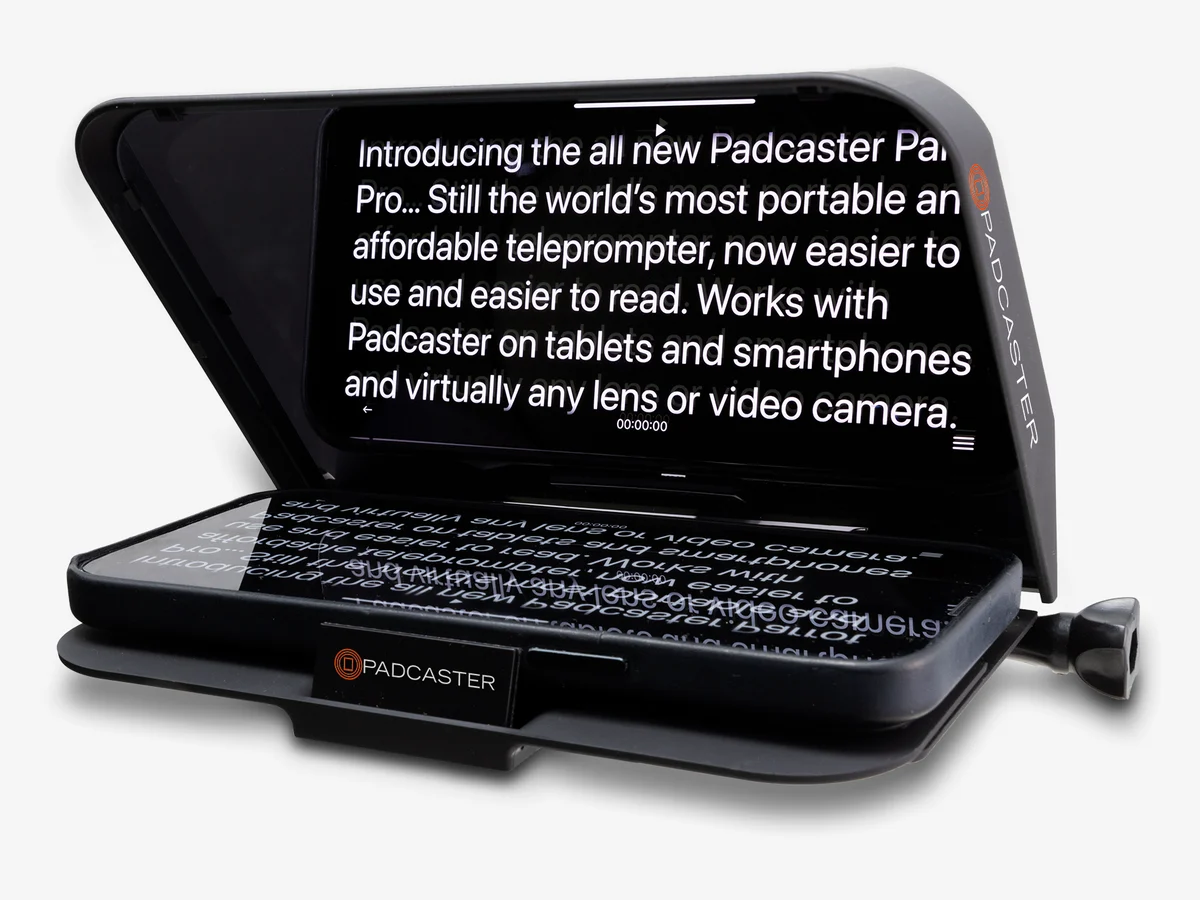
5. Padcaster Parrot Pro: Best Teleprompter for Phone Shooters
The Padcaster Parrot Pro takes the opposite approach to everything above: instead of a rig your camera sits behind, it screws directly onto your lens filter thread, so the camera carries the prompter. Your phone becomes the prompt screen, the free Parrot app runs the script, and the whole thing packs into a padded case smaller than a lunchbox.
It is a close range tool for desk and talking head work, not a room sized setup, and Padcaster sells it direct rather than through an Amazon listing, so the button below runs a search. Check the full details below.
Technical features
- Direct Lens Mount screws straight onto the camera lens filter thread; no separate rig to balance
- Also works on a stand or tripod through an integrated 1/4-20 mount
- 30R/70T beam splitter glass: 30% of the light reflects to you, 70% passes to the camera
- Sized for smartphones: Padcaster’s spec list fits phones up to 4.2 inches wide, so measure yours first
- Free Padcaster Parrot app for iOS and Android: mirror mode, scroll speed, text size and color, margins, loop playback and Dropbox sync
- Works with a Bluetooth remote for hands free control
- Coated ABS polycarbonate body, about 6.5 x 5.5 x 3 inches
- Custom padded carry case included, with a lifetime warranty from Padcaster
Pros
- Nothing to balance or build: it rides on the lens itself
- Tiny footprint, and it travels in its own padded case
- Padcaster rates setup at under a minute once the app is paired
Cons
- Phones wider than 4.2 inches need careful measuring before you order
- The small glass suits desk distance, not standing across a room
- No Amazon listing exists: you buy it from Padcaster or a camera retailer
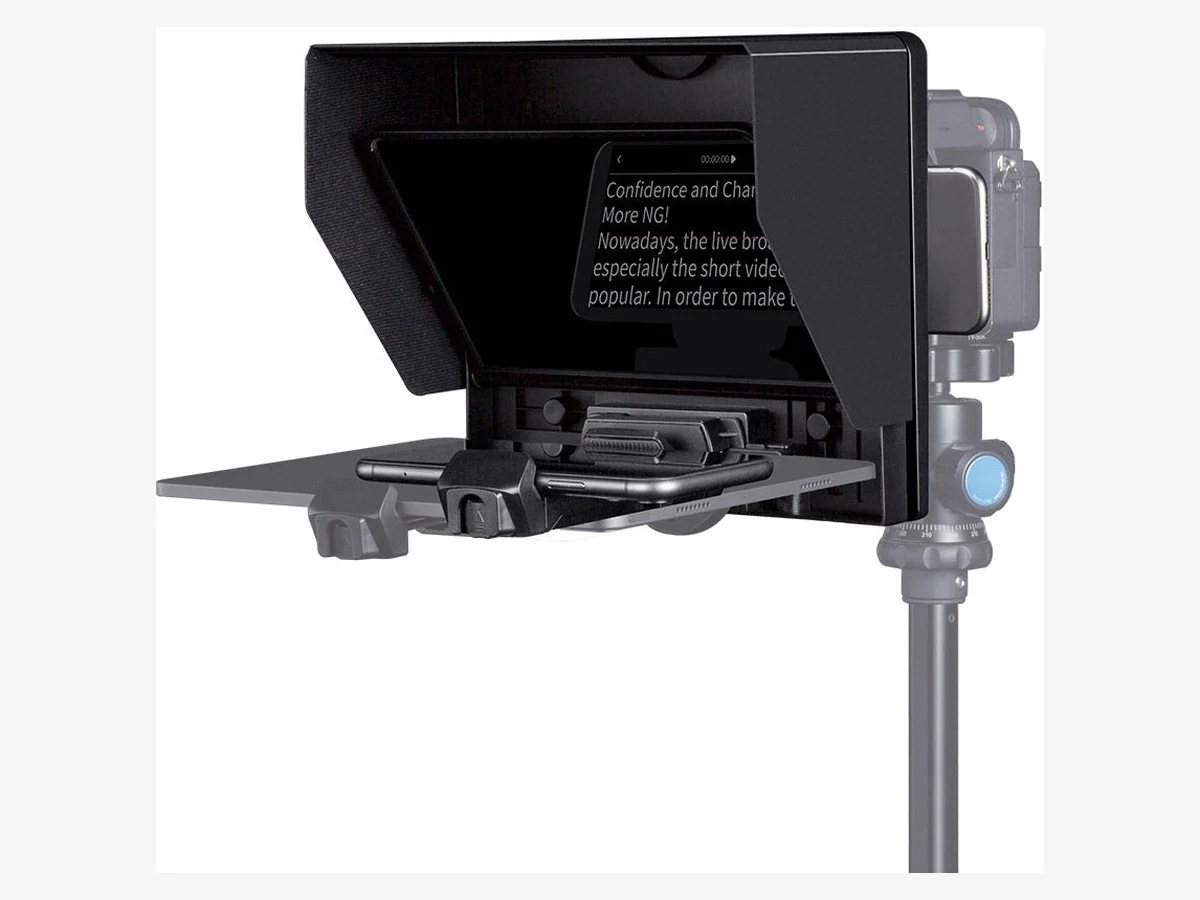
6. FEELWORLD TP10: Best Budget Folding Teleprompter
The FEELWORLD TP10 is the one to throw in a bag: it folds down to 27 mm thick, weighs 315 g, and still includes a Bluetooth remote and eight lens rings in the box. For creators who film in different places, or who shoot vertical Shorts as often as long videos, that portability is the whole point.
The honest catch is the glass. Its 50/50 split reflects more light to you and passes less to the camera than the 70/30 glass above, which costs about a full stop of light. The glass section below explains what that means in practice. Check the full details below.
Technical features
- 10 inch beam splitter glass with a 50/50 transmission and reflection split
- Bluetooth remote controller in the box, with a maker rated range of 100 m
- FEELWORLD teleprompter app for iOS and Android controls play, pause, speed and font
- Eight lens adapter rings in the box: 49, 52, 55, 58, 62, 67, 72 and 77 mm
- Takes a phone or tablet up to 11 inches as the prompt screen
- Shoots with a DSLR or a phone, horizontally or vertically
- FEELWORLD rates it for wide angle lenses, unlike the tablet rigs above
- Folds flat to 27 mm; 315 g in ABS
- Five 1/4 inch threads: two on top for a microphone or light, three below for a tripod or stand
- Sun hood and custom carrying case included
Pros
- Folds flatter and lighter than anything else in this guide
- Remote and lens rings included, with nothing extra to buy
- Vertical shooting suits Shorts and TikTok workflows
Cons
- The 50/50 glass costs the camera about a full stop of light
- The 10 inch glass is a desk distance tool, not a room tool
- Plastic build feels less substantial than the aluminium rigs
Side by Side: All Six Teleprompters Compared
The whole guide on one screen. Note the honest gaps: three makers publish no reading range at all, and one publishes no glass figure.
| Teleprompter | Prompt display | Glass | Maker read range | Remote | Best for |
|---|---|---|---|---|---|
| Elgato Prompter | 9in built in | 70/30 | Up to 6 ft | No, app control | Desk setups |
| Elgato Prompter XL | 15.6in built in | 70/30 | 10 to 15 ft | No, app control | Standing and studio setups |
| Glide Gear TMP 100 | Your phone or tablet | Not published | Up to 10 ft | Not included | Classic tablet rigs |
| NEEWER Basics X12B | Your tablet | 75% transmission | Up to 10 ft | Yes, RT113 | Tablet users |
| Padcaster Parrot Pro | Your phone | 30R/70T | Not published | Works with Bluetooth remotes | Phone shooters |
| FEELWORLD TP10 | Your phone or tablet | 50/50 | Not published | Yes, Bluetooth | Budget and travel |
Read ranges are the makers’ own figures. Where a maker publishes none, treat the prompter as a close range, desk distance tool, because that is what the silence means in practice.
App Only, Phone Rig or Built In Display: Which Path Fits You?
Start with the free option and climb only when it breaks. A teleprompter app on your phone, propped beside the lens, is enough to learn whether you even like reading on camera. Hardware earns its money when the eye movement starts to show, when the phone is needed as the camera itself, or when you record too far away for a small screen.
| Your situation | The right tool | What you give up |
|---|---|---|
| Script on a phone next to the camera | A free teleprompter app and a small stand | Your eyes sit off the lens axis, and viewers can see it in close shots |
| The phone is both camera and screen | A lens mounted or folding phone prompter: Parrot Pro, TP10 | Small glass and a close reading distance |
| A tablet plus a real camera | A beam splitter rig: TMP 100, X12B | Setup time, and you supply the screen and the app |
| Camera and computer in a fixed setup | A built in display prompter: Prompter, Prompter XL | The highest cost, and a computer always in the loop |
Whichever rung you land on, the script matters more than the glass. Lines written the way you actually talk survive any prompter; stiff written language sounds stiff read aloud, which is why our guide to how to script a vlog focuses on writing for the ear first. Podcasters should think about distance before anything else, since a video podcast setup usually puts the camera further away than a desk does, and our guide to starting a video podcast walks through that framing.
Live creators get the same benefit mid stream: a prompter keeps your intro, your segment changes and your sponsor reads on the lens while you livestream on YouTube, with no glancing down at notes.
How Far Will You Sit? Match Size to Reading Distance
Buy for the distance you actually record at, not for the biggest glass you can afford. A prompter that is too small makes you squint and lean in; one that is too big for a desk pushes the text so wide that your eyes visibly travel. The makers’ own stated ranges draw the map:
| Teleprompter | Maker stated read range | Prompt screen |
|---|---|---|
| Elgato Prompter | Up to 6 ft (1.8 m) | 9in built in display |
| Glide Gear TMP 100 | Up to 10 ft | Your tablet, up to 10.5 x 8 in |
| NEEWER Basics X12B | Up to 10 ft (3 m) | 12in glass, your tablet |
| Elgato Prompter XL | 10 to 15 ft | 15.6in built in display |
| Parrot Pro and TP10 | No range published | Phone sized and 10in glass |
Most desk channels record 2 to 4 feet from the lens, where every pick here works and the small Elgato is in its element. Standing presenters, cooking and fitness channels, and anyone who gestures at a whiteboard live in the 6 to 10 foot band, which is TMP 100 and X12B territory, with the XL beyond it.
Before you upsize, use the free lever: font size. Bigger text on a smaller screen often reads as comfortably as a bigger prompter, and narrowing the text column keeps your eyes near the lens axis. Distance changes how natural your eye line looks too, since text that sits further from the axis pulls your gaze with it, something our talking head tips guide covers in detail.
Beamsplitter Glass: What the Split Does to Your Picture
Beamsplitter glass is a partial mirror. It reflects your script toward you while letting the camera shoot straight through it, and the split ratio tells you how the light is shared. More reflection means brighter text for you and a dimmer image for the camera; more transmission means the opposite.
The figures from the makers’ own pages: a 70/30 glass, fitted to both Elgatos and, as 30R/70T, to the Parrot Pro, passes 70% of the light to the camera, which costs roughly half a stop. The X12B passes 75%, a little under half a stop, the brightest camera image in this guide. The TP10 passes 50%, a full stop of light gone. In a bright room you will never notice any of this; in a dim room the TP10’s cost is real, and its brighter reflection is the fair trade it offers back.
One honest gap: Glide Gear does not publish a split or a transmission figure for the TMP 100, so its light loss cannot be stated here. If you buy one, run a quick exposure test with your own camera before the first real shoot.
If your room is already dim, that lost light matters more than any other number in this guide, and fixing the room beats fighting the glass. Our guide to how to light your face for videos is the cheaper upgrade.
Before You Buy: The Compatibility Checklist
Seven checks, five minutes, and you will never order a prompter your rig cannot use. Run them against the pick you are about to buy:
- Your lens thread size. It is printed on the front ring of the lens. The Prompter and the XL include step up rings from 49 to 82 mm, the TP10 covers 49 to 77 mm, the Parrot Pro screws onto the thread itself, and the TMP 100 and X12B use backplates and hoods instead of rings.
- Your lens length. The Prompter takes lenses up to 11 cm long and the XL up to 22 cm. The TMP 100’s own manual caps the fit at 7.9 inches (20 cm) from the camera’s mounting hole to the front of the lens.
- Wide lenses. The X12B rules them out: NEEWER specifies a camera lens longer than 28 mm. FEELWORLD rates the TP10 for wide angle lenses. Either way, keep the glass inside the frame, because a prompter your lens can see into is a prompter you will return.
- Your tablet’s real size. TMP 100: up to 10.5 x 8 inches, and no iPad Pro at all. X12B: up to 9.84 x 8.68 inches, with the iPad Pro 11 inch welcome and the 12.9 inch excluded. TP10: up to 11 inches.
- The phone as camera. The X12B cannot do it; NEEWER says so itself. The Parrot Pro and TP10 are built for it, the TMP 100 includes an offset adapter for it, and the Elgato Prompter needs a separate phone mount before a phone can be the camera.
- Your computer and your stand. Voice Sync on either Elgato needs an NVIDIA RTX 2060 or newer, or Apple M1 or newer. The XL additionally needs a USB-C port that delivers 15 W, plus a tripod or C-stand you trust with 3.37 kg of prompter and your camera on top of it.
- The remote. Only the X12B (its RT113) and the TP10 (Bluetooth) include one in the box. Everywhere else, control means an app on the prompting device or, on the Elgato pair, your voice through Voice Sync.
If a pick fails one of your checks, it is the wrong pick no matter how good its reviews are. Move to the next one on the list and run the checks again.
Teleprompter FAQs
Do I really need a teleprompter for YouTube?
If your videos are scripted word for word, tutorials, reviews, explainers, a teleprompter is the difference between reciting and presenting: your eyes stay on the lens and the take count drops. If you work from bullet points and improvise around them, skip it. A free app on a phone beside the camera is the honest trial run before you spend anything.
What size teleprompter should I buy?
Match it to your recording distance. Desk setups 2 to 4 feet from the lens suit the 9 to 12 inch class, including the Elgato Prompter and the X12B. Standing setups in the 6 to 10 foot band want a 12 inch rig at least, and anything beyond that points to the Prompter XL, which Elgato rates for 10 to 15 feet.
Does a teleprompter make my footage darker?
Yes, by a fixed amount set by the glass. Prompters passing 70 to 75% of the light cost roughly half a stop or less, which most cameras absorb without visible harm. The TP10’s 50/50 glass costs a full stop, so give it a brighter room or a faster lens. The fix is light, not settings gymnastics.
Can I record with my phone through a teleprompter?
It depends on the model, and the makers are clear about it. The Parrot Pro and the TP10 are built for phone shooting, the TMP 100 includes an offset adapter to center a phone’s lens, and the Elgato Prompter needs a separate phone mount. The NEEWER X12B is the exception: NEEWER states it is not for phone shooting, so a phone can only be its prompt screen.
Will an iPad Pro work as the prompt screen?
The 11 inch iPad Pro fits the X12B. The 12.9 inch model fits none of the bring your own screen rigs in this guide: the TMP 100 excludes iPad Pro entirely, and the X12B caps the screen at 9.84 x 8.68 inches. Owners of the big iPad should pick a built in display prompter or use a smaller tablet for prompting.
What does 70/30 glass mean?
It is the split of light at the glass: about 30% reflects toward you as readable text and 70% transmits through to the camera. It is the standard balance because the camera needs the light more than you do. A 50/50 glass like the TP10’s reflects more, so text stays readable in bright rooms, at the cost of a dimmer camera image.
Is a teleprompter useful for livestreaming?
Yes, for the scripted parts of a stream: the intro, segment changes, announcements and sponsor reads. Your eyes stay on the lens instead of dropping to notes, and control by remote or voice keeps your hands free. Most streamers prompt the structure and improvise inside it, which sounds the most natural.
How fast should the teleprompter text scroll?
At your natural speaking pace, which for most presenters lands around 135 to 155 words per minute. If you catch yourself rushing to keep up or racing ahead, the scroll speed is wrong, not your delivery. Voice Sync and a remote both exist to remove this friction, so use whichever your prompter offers.
Why do my eyes still move when I read from a prompter?
Usually the text column is too wide, so your eyes sweep side to side, or the screen is so close that small movements read as large ones. Narrow the column in the app so the words sit near the lens, raise the font instead of widening the column, and sit a little further back if your prompter’s range allows it.
Teleprompter, cue cards or memorizing: which is best?
For short videos, memorizing or bullet notes usually sounds the most natural. For long, exact scripts, product details, numbers, quotes, a teleprompter wins on accuracy and on retakes. Cue cards are the middle path, but they pull your eyes off the lens axis, which is the very problem a prompter solves.
Can I film vertical Shorts with a teleprompter?
Yes. The TP10 shoots vertically as well as horizontally, and phone prompters like the Parrot Pro simply follow the phone’s orientation. Keep the text column narrow in vertical framing, since there is less width to hide eye movement in, and the same scroll pace rules apply.
Which teleprompter is best for a beginner?
The one that fits the camera and desk you already have. Desk creators with a computer in the setup get the easiest start from the Elgato Prompter, because there is no second screen to manage. Phone first creators should start with the TP10 or the Parrot Pro. Beginners with a tablet and a camera should look at the X12B and its included remote.
This guide is research-based curation: we compared manufacturer specifications, published reviews, and current prices. Read how we choose.